2021-05-18

Importing an Encrypted Backup into Azure Managed SQL

Let’s say you’re moving an encrypted backup into Azure. The encryption was set up like this

CREATE CERTIFICATE BackupKey   
   ENCRYPTION BY PASSWORD = 'a password that''s really strong here'  
   WITH SUBJECT = 'test1backup',   
   EXPIRY_DATE = '20220101';  
GO  

Now we need to export this certificate which can be done with

BACKUP CERTIFICATE BackupKey TO FILE = 'c:\temp\backupkey.cer'
WITH PRIVATE KEY (
    FILE = 'c:\temp\backupkey.pvk',
    DECRYPTION BY PASSWORD = 'a password that''s really strong here',
    ENCRYPTION BY PASSWORD = 'A strong password for the certificate' )

Now we have two file which contain the public and private keys. We need to combine these into something that Azure Key Vault can understand and this something is a .pfx file. There is a tool called pvk2pfx which can be used for this task and it is found in the Windows Enterprise Driver Kit https://docs.microsoft.com/en-us/windows-hardware/drivers/download-the-wdk. It is also installed as part of visual studio. On my machine it was in C:\Program Files (x86)\Windows Kits\10\bin\10.0.17763.0\x86\pvk2pfx.exe

Run this command to combine them

& "C:\Program Files (x86)\Windows Kits\10\bin\10.0.17763.0\x86\pvk2pfx.exe" -pvk C:\temp\backupkey.pvk -pi 'A strong password for the certificate' -spc C:\temp\backupkey.cer -pfx c:\temp\backupkey.pfx

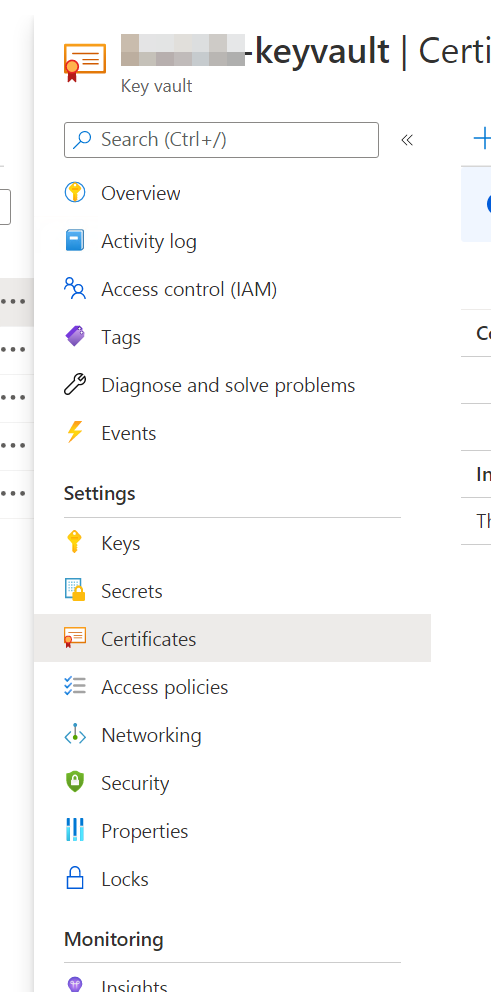
Next up we need to import this key into azure keyvault. This can be done using the GUI or the command line tools. Everybody likes a pretty picture so let’s use the Portal. Click into the key vault and then under certificates

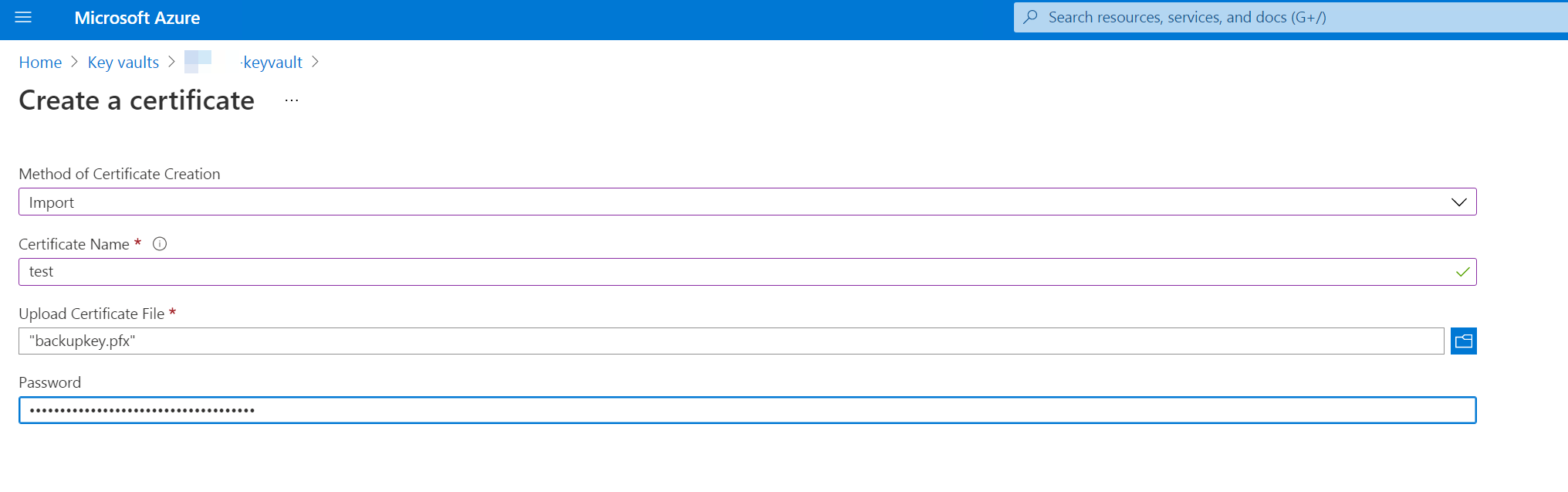
Then click on Generate/Import and fill in the form there selecting the .pfx file created above.

The password will be the same one you used when exporting from SQL server. Once the certificate is imported it should be available to anybody or any application with access to certificates in key vault.

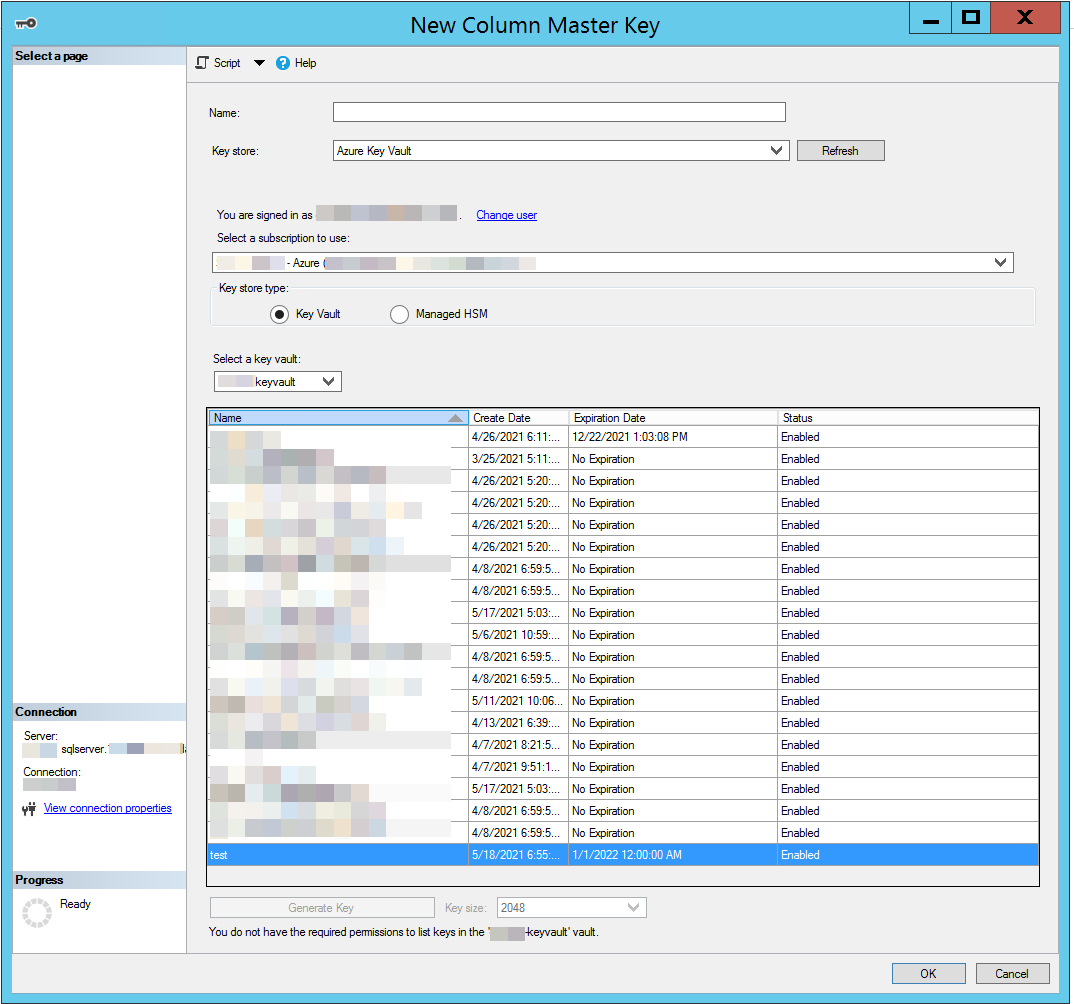
You can open up SQL Server Management Studio and in there add a new certificate selecting the certificate from the Key Vault connection

2021-05-11

JQ

This is a really nice tool for manipulating JSON on the command line. The syntax is, however, esoteric like you would not believe. Here are some cheats to help out

If you have an array and want to take just the object at a specific index

.[3]

which returns the 3rd element

If you want to extract a value from an array of objects then you can use

.[].LicensePlate

This works for multiple levels too so if you have nested objects you can

.[].LicensePlate.Province

Given an array where you want to filter it then you can use this

[ .[] | select( .LicensePlate | contains("PM184J")) ] 

To select a single field you could then do

[ .[] | select( .LicensePlate | contains("PM184J")) ] |  map( .LicensePlate)

If you want multiple fields built back into an object do

{LicensePlate: .[].LicensePlate, EndTime: .[].EndTime}
2021-05-10

Creating a Shortcut in Powershell

You can’t really create a shortcut in powershell directly but you can using the windows script host from powershell. For instance here is how you would create a new desktop icon to log the current user off.

$WshShell = New-Object -comObject WScript.Shell
$Shortcut = $WshShell.CreateShortcut("$home\Desktop\LogOff.lnk")
$Shortcut.TargetPath="C:\Windows\System32\shutdown.exe"
$Shortcut.Arguments="/l"
$Shortcut.IconLocation="C:\windows\system32\Shell32.dll,44"
$Shortcut.Save()

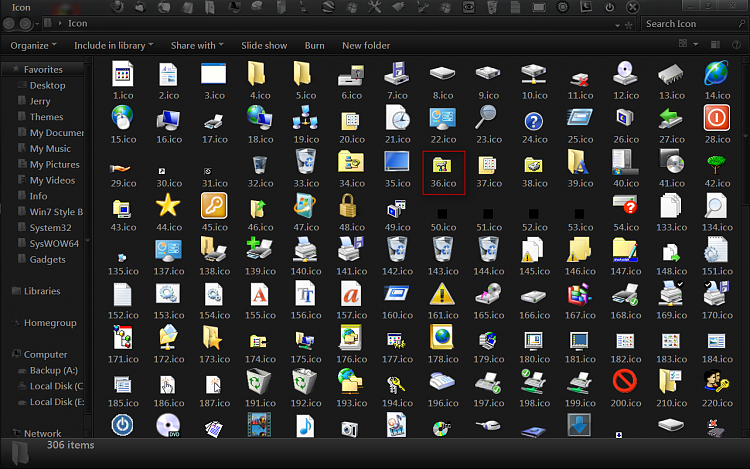
The icon here is taken from the long list of icons in Shell32.dll in this case it is the little orange key icon. These icons are going to be refreshed soon so your mileage may vary on them. I found the right icon by just google image searching shell32.dll icon and found a picture of some of the index numbers. They were 1 indexed so I had to subtract 1

2021-05-10

Setting Timezone from Powershell

This is pretty easy.

Set-Timezone -Id "US Eastern Standard Time"

You need to know the id of the timezone and you can figure that out using

Get-Timezone -ListAvailable
Id                         : Dateline Standard Time
DisplayName                : (UTC-12:00) International Date Line West
StandardName               : Dateline Standard Time
DaylightName               : Dateline Daylight Time
BaseUtcOffset              : -12:00:00
SupportsDaylightSavingTime : False

Id                         : UTC-11
DisplayName                : (UTC-11:00) Coordinated Universal Time-11
StandardName               : UTC-11
DaylightName               : UTC-11
BaseUtcOffset              : -11:00:00
SupportsDaylightSavingTime : False
...

You can also see the current timezone by running

Get-Timezone
Id                         : Mountain Standard Time
DisplayName                : (UTC-07:00) Mountain Time (US & Canada)
StandardName               : Mountain Standard Time
DaylightName               : Mountain Daylight Time
BaseUtcOffset              : -07:00:00
SupportsDaylightSavingTime : True
2021-05-07

Setting a persistent environment variable

If you want to set a variable but you want it to live forever then you can use

[System.Environment]::SetEnvironmentVariable("JAVA_HOME", "c:\program files\openjdk\jdk-13.0.2", "Machine")

That last argument can take on the values {Process, User, Machine}

2021-05-06

Create or Update Index

Of course the SQL server syntax for this doesn’t quite jive with what I want but you can use the clause WITH (DROP_EXISTING = ON) to have SQL server handle updating an existing index keeping the old index live until the new version is ready. You use it like

CREATE NONCLUSTERED INDEX idxMonthlyParkers_vendor_expiry_issue
ON [dbo].[tblParkers] ([VendorId],[LotTimezoneExpiryDate],[LotTimezoneIssueDate])
INCLUDE ([HangTagCode],[FirstName],[LastName])
 WITH (DROP_EXISTING = ON)

However that will throw an error if the index doesn’t exist (of course) so you need to wrap it with an if

if exists (SELECT * 
FROM sys.indexes 
WHERE name='idxMonthlyParkers_vendor_expiry_issue' AND object_id = OBJECT_ID('dbo.tblMonthlyParker'))
begin
    CREATE NONCLUSTERED INDEX idxMonthlyParkers_vendor_expiry_issue
    ON [dbo].[tblParkers] ([VendorId],[LotTimezoneExpiryDate],[LotTimezoneIssueDate])
    INCLUDE ([HangTagCode],[FirstName],[LastName])
    WITH (DROP_EXISTING = ON)
end
else 
begin
    CREATE NONCLUSTERED INDEX idxMonthlyParkers_vendor_expiry_issue
    ON [dbo].[tblParkers] ([VendorId],[LotTimezoneExpiryDate],[LotTimezoneIssueDate])
    INCLUDE ([HangTagCode],[FirstName],[LastName])
end
2021-05-06

Transforms

You can apply little transforms by just writing XML transformation on configuration files. For instance here is one for adding a section to the system.web section of the configuration file

<?xml version="1.0"?>
<configuration xmlns:xdt="http://schemas.microsoft.com/XML-Document-Transform">
  <system.web>
    <machineKey xdt:Transform="Insert" decryptionKey="abc" validationKey="def" />
  </system.web>
</configuration>

Here is one for removing an attribute

<?xml version="1.0"?>
<configuration xmlns:xdt="http://schemas.microsoft.com/XML-Document-Transform">
  <system.web>
    <compilation xdt:Transform="RemoveAttributes(debug)" />
  </system.web>
</configuration>

How about changing an attribute based on matching the key?

<?xml version="1.0"?>
<configuration xmlns:xdt="http://schemas.microsoft.com/XML-Document-Transform">
  <appSettings>
    <add key"MaxUsers" value="3" xdt:Transform="SetAttributes" xdt:Locator="Match(key)" />
  </appSettings>
</configuration>

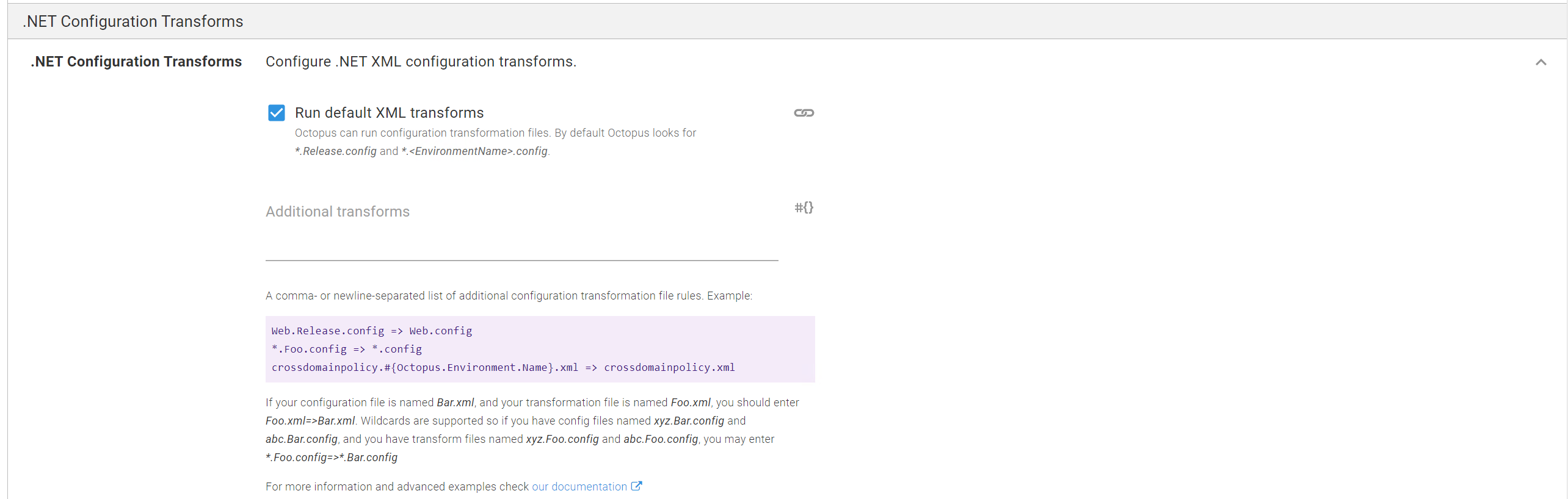
If you happen to be using Octopus Deploy they have a feature you can add to your IIS deployment task to run these transformations

Testing

There is a great little online testing tool at https://elmah.io/tools/webconfig-transformation-tester/ where you can plug in random things until you get them working.

2021-05-03

Query BigTable Events

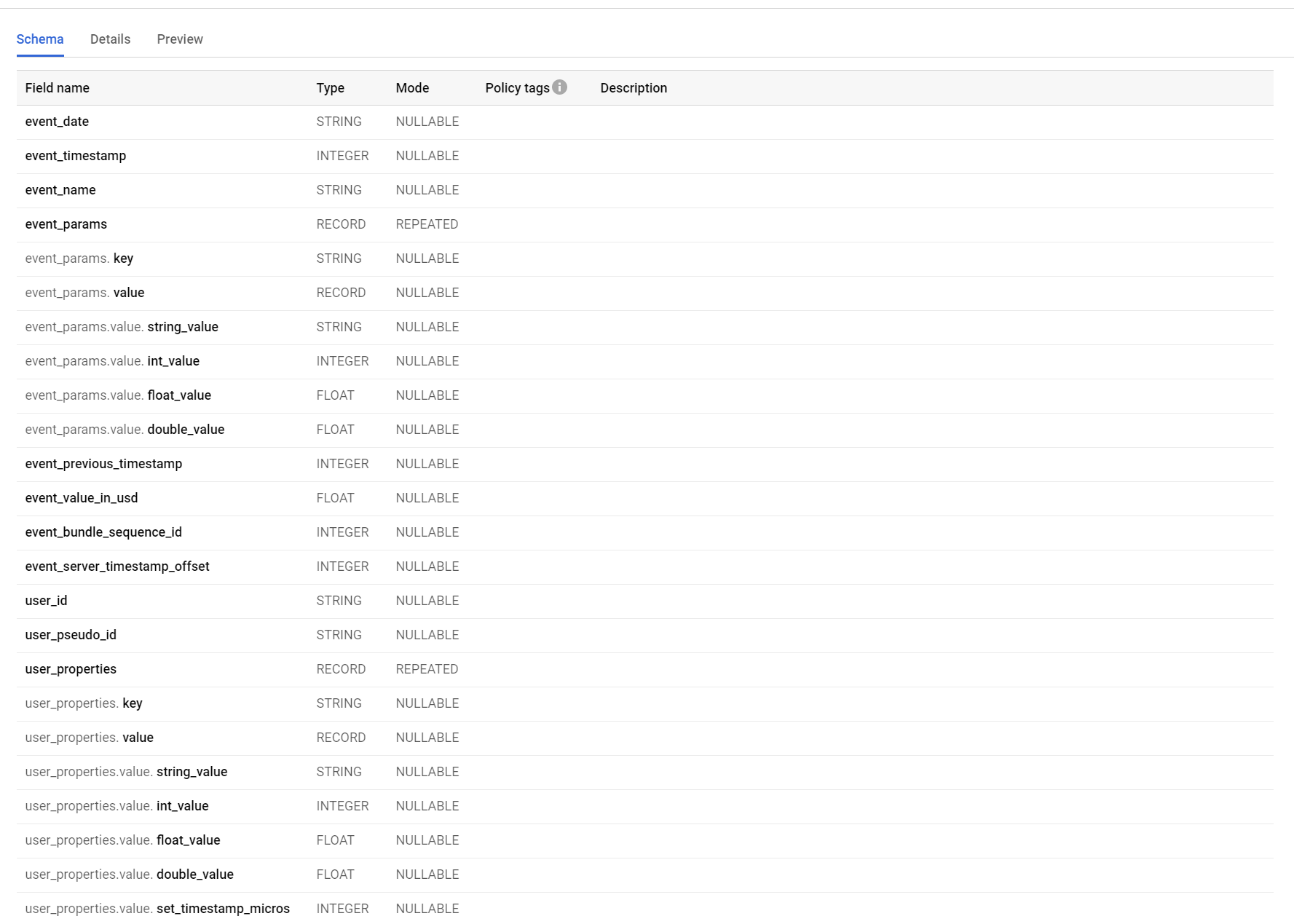
Firebase can feed its data to bigtable and then you can run queries there. The syntax is SQL like but not quite because they have internal record types. So for the data that is fed across from firebase you get a structure that looks like

You can see that event_params and user_properties are these kind of collection things. The easiest way to deal with them is to flatten the structure and internally join the table against itself

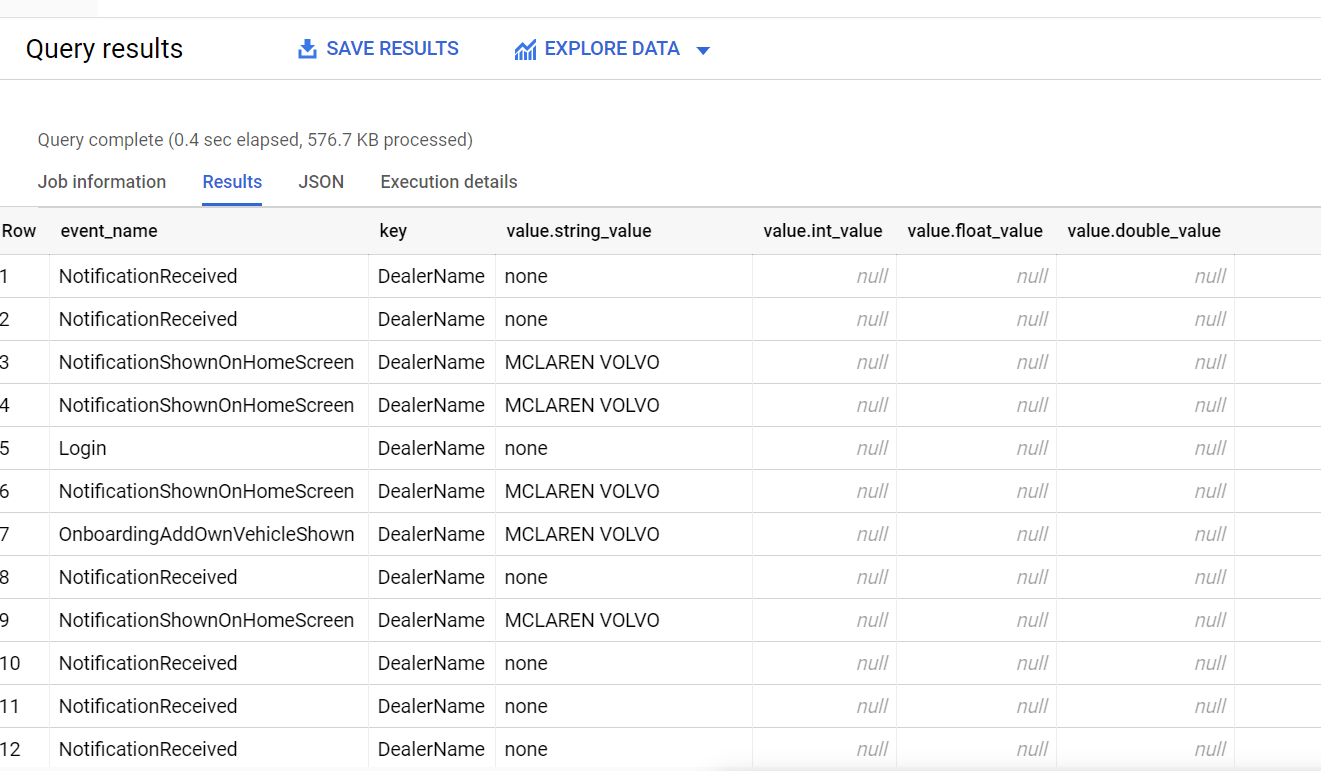
SELECT r.event_name, p.key, p.value FROM `pocketgeek-auto.analytics_258213689.events_intraday_20210305` r cross join unnest(r.event_params) as p where key = 'DealerName'

This gets you a dataset like

SELECT r.event_name, p.key, p.value FROM `pocketgeek-auto.analytics_258213689.events_intraday_20210305` r cross join unnest(r.event_params) as p where key = 'DealerName' and p.value.string_value <> 'none'

is probably even better with the filter

2021-05-02

Taking Notes

Taking notes is hard. I think I took notes in university but I wasn’t very good at it. I’d either put everything in them making them unapproachably long or I’d put in too little information. As a result I’ve kind of shied away from taking notes in my professional career. Unfortunately, is it starting to bite me more and more as I jump around between technologies and projects. I often find myself saying “shoot, I just did this 6 months ago - how do I do that?”

Read More